Installing Proofi takes two lines of HTML:
<div id="jts-widget-8e4d..."></div>
<script src="https://proofi.co/widget.js" data-widget-id="8e4d..." async></script>
The UUID is shortened here. The source excerpts below are also abridged. They keep the control flow relevant to the discussion and leave out unrelated state updates or DOM attributes.
The short snippet is possible because most of the work happens elsewhere: in a loader, a JSON endpoint, a Shadow Root, and a small Preact application.
Proofi runs in a document we do not own. We do not know which framework built the page, what its global CSS does, or when it will execute our script. We cannot even assume the widget container is as wide as the browser. Those unknowns drove most of the implementation.
The request path
A cold public load crosses the browser and service boundary twice: once for the script, then again for the widget data.
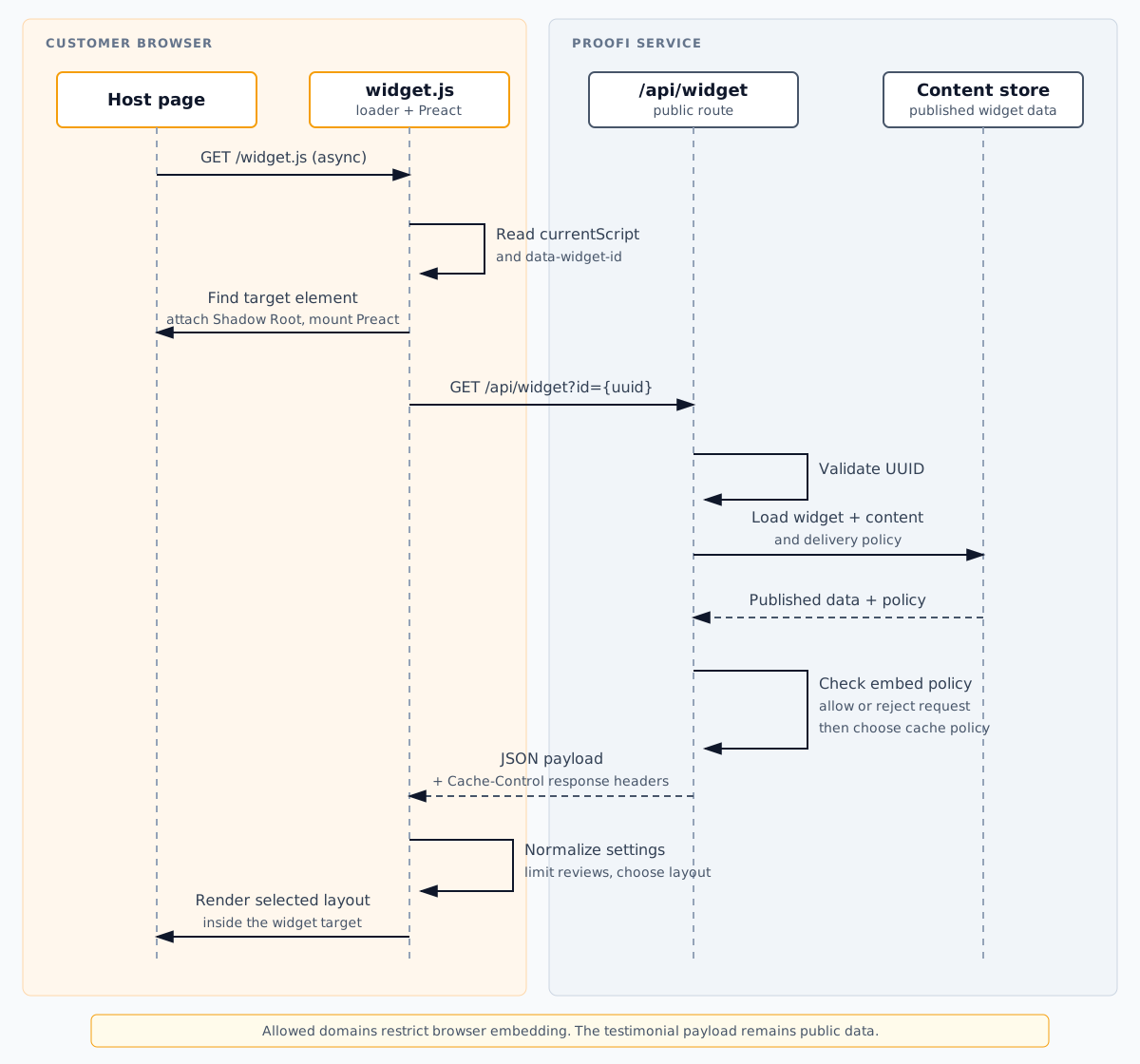
Open the sequence diagram at full size.
We keep the script and content separate. The runtime and testimonial payload can then use different delivery and cache paths, and a customer can edit a quote without deploying the host website.
The script tag is the loader context
Rollup builds the widget as an IIFE containing Preact, every layout, and the loader. Terser minifies the result and removes comments.
The loader at the bottom of the bundle starts with document.currentScript:
const currentScript = document.currentScript
if (!currentScript) return

const url = new URL(currentScript.src, document.baseURI)
const id = currentScript.dataset.widgetId || url.searchParams.get('id')
if (!id) return

const element = document.getElementById(`jts-widget-${id}`)
if (!element) return
document.currentScript gives each execution its own context. A page can include several widgets, each with a different data-widget-id, even though every script element points to the same widget.js URL. The browser may reuse or revalidate that URL according to its response headers.
There is a sharp edge here. The target must already exist, and the suffix in its ID must match the widget ID. We do not run a MutationObserver or poll the page for a target that appears later. If a tag manager or client-side router inserts the target, it also has to execute the loader afterward.
A misplaced async script therefore exits without mounting anything. It emits no warning or telemetry. The behavior is predictable, but it gives the person integrating the widget very little to work with. An explicit Proofi.mount(element, id) API would be a cleaner option for client-rendered applications and would avoid a permanent document observer. An opt-in debug mode or a namespaced browser event could expose failures without writing unsolicited messages to the host page's console.
A CSS boundary without an iframe
Once it finds the target, the loader attaches an open Shadow Root, adds the stylesheet, and creates a mount for Preact:
const root = element.shadowRoot || (
  element.attachShadow
    ? element.attachShadow({ mode: 'open' })
    : element
)

let mount = root.querySelector('[data-proofi-widget-root]')

if (!mount) {
  const style = document.createElement('style')
  style.textContent = widgetStyles
  root.appendChild(style)

  mount = document.createElement('div')
  mount.dataset.proofiWidgetRoot = ''
  root.appendChild(mount)
}

render(<Widget widgetId={id} baseUrl={url.origin} />, mount)
When the browser supports Shadow DOM, broad selectors from the host page cannot reach the paragraphs, buttons, and cards inside the root. We leave the root open, so the widget remains inspectable in browser tools. The loader falls back to mounting directly in the target element when attachShadow is unavailable; that path loses CSS isolation. Shadow DOM is a styling boundary, not an authorization mechanism. The API controls which published fields the widget receives.
The host element also establishes CSS containment:
:host {
  display: block;
  width: 100%;
  min-width: 0;
  container-type: inline-size;
  contain: layout style;
}
Container queries switch the layout at 720 and 480 pixels. A grid in a narrow sidebar responds to the width it actually receives, even on a wide monitor. A viewport media query would miss that case.
We chose Shadow DOM instead of an iframe for the public widget because the widget needs to take part in normal page layout. An iframe has a stronger document boundary, but it brings height synchronization and its own responsive context. The dashboard preview does use an iframe. There, sandboxing preview content matters more than direct participation in the page layout.
The data endpoint is part of the public contract
On a public page, the Preact component fetches its payload from the origin that served the script:
const controller = new AbortController()

fetch(`${baseUrl}/api/widget?id=${encodeURIComponent(widgetId)}`, {
  signal: controller.signal,
})
  .then((response) => {
    if (!response.ok) throw new Error(`Widget request failed: ${response.status}`)
    return response.json()
  })
  .then(setData)
  .catch(handleError)

return () => controller.abort()
The API rejects a malformed ID before it queries storage. For a valid widget, the payload loader gathers the settings, ordered testimonials, branding policy, and cache metadata. The route applies the widget's embed policy and returns the public rendering data in this shape:
{
  "widget": {
    "id": "8e4d...",
    "name": "Homepage proof",
    "settings": { "layout": "grid", "columns": 3 }
  },
  "reviews": [],
  "testimonials": [],
  "showBranding": true,
  "brandingStyle": "dark_large"
}
Why return both reviews and testimonials? Proofi is moving from widget-owned reviews to project-owned testimonials. The runtime reads reviews first and uses testimonials as a fallback. Doing the translation at the API boundary keeps deployed scripts working with migrated accounts.
Everything on this endpoint is publishable widget content. Private dashboard state and Supabase credentials are not part of the payload.
The endpoint is a public read path because a visitor's browser needs the data to render the widget. Dashboard writes still require an authenticated owner. A widget UUID identifies published content; it is not treated as a secret.
The two testimonial field names buy migration time, but they also leave contract debt. The endpoint has no explicit schema version today. Removing the alias safely would require a coordinated runtime rollout and enough time for old scripts to disappear from caches. A versioned script URL and a versioned payload would make that retirement much easier to reason about.
Public and restricted widgets cache differently
An unrestricted widget gets these shared-cache headers:
Cache-Control: public, max-age=N, s-maxage=N, stale-while-revalidate=2NN comes from the account plan. A browser can reuse a fresh payload, and a shared cache can answer without another storage read. During the stale window, that cache may return the previous response while refreshing it in the background.
Domain-restricted widgets use private caching instead:
Cache-Control: private, max-age=N
Vary: Origin
The route checks the request against the widget's configured embed policy. A mismatch returns 403. Restricted responses use private caching and vary by origin.
This restriction discourages another site from embedding the widget in a browser. It does not make a published testimonial confidential, so this route only returns content intended for publication.
Caching has an obvious cost: an edit in the dashboard may stay stale until the active window expires. Changing the widget ID would defeat the stable snippet, so the dashboard preview bypasses the public cache.
The stable /widget.js URL also limits how aggressively we can cache the runtime. Marking an unversioned script as immutable could leave an old version in browsers after a deployment. A versioned URL would allow long-lived immutable caching without making releases wait for cache expiry.
The preview uses the same renderer with different transport
The dashboard preview uses the same widget.js, but waiting on a cached public response after every color or layout change would make the editor sluggish. Review changes reload the preview document because the data set changed. Setting changes go to the existing iframe through postMessage.
The preview route loads the payload on the server and writes it into the document:
<script nonce="{random-nonce}">
  window.__JTS_DATA__ = { /* widget payload */ };
</script>
<script
  nonce="{random-nonce}"
  src="/widget.js?t={cache-buster}"
  data-widget-id="{uuid}"
  async
></script>
The serializer escapes characters that can break an inline script. The response uses a nonce-based Content Security Policy, disables caching, and only allows the same site to frame it. Styles still allow unsafe-inline because the widget uses an injected stylesheet and inline style properties.
The iframe has sandbox="allow-scripts", which lets the widget execute without giving it same-origin access to the dashboard. At startup, the runtime checks window.__JTS_DATA__. If the ID matches, it renders the injected payload and skips the public fetch.
Settings arrive through a small message contract. This abridged excerpt shows the source-window and message-shape guards; it is not an origin check:
if (
  event.source !== window.parent &&
  event.source !== window
) return

if (
  event.data?.type !== 'JTS_UPDATE_SETTINGS' ||
  typeof event.data.settings !== 'object'
) return

setSettings((current) => ({ ...current, ...event.data.settings }))
The trust model comes from the surrounding preview boundary. The dashboard owns the iframe, the preview response restricts who can frame it, and the sandbox removes same-origin access. The channel only carries display settings. After the source and shape checks, the iframe merges a valid update and keeps its current review data. Layout changes briefly show a skeleton unless the visitor prefers reduced motion. Account data and privileged commands do not use this channel; carrying either would require a different message design.
What the browser actually downloads
I do not find "small" useful without a number. On August 12, 2026, the checked-in production bundle measured:
Raw:     30,946 bytes
Gzip:    10,798 bytes
Brotli:   9,676 bytes
These are local compression measurements, not total bytes transferred over HTTP. The repository command rebuilds the Rollup artifact, then uses Node's default gzip and Brotli settings:
npm run widget:sizeThe result includes Preact and all eight layouts. The bundle loads no external UI package or web font. Rollup emits one minified IIFE without a source map.
A cold load has two core responses, the static script and the JSON payload. Reviewer photos add their own requests when the selected layout displays them. The payload has an explicit cache policy. Whether the browser reuses or revalidates the script depends on the static-file headers at deployment.
async keeps the script download from blocking HTML parsing, but it does not make execution free. The code still runs on the main thread, and the rendered widget still takes up space. A site that puts Proofi above the fold should reserve a sensible minimum height to reduce layout shift. We cannot promise a page-level Lighthouse score without knowing the page around the widget.
Defensive rendering at the boundary
The runtime treats stored settings as input and normalizes them before rendering. It clamps ratings between zero and five. Column count, animation speed, and maximum items all have bounds and fallback values. An unknown layout falls back to the carousel instead of becoming a component lookup error.
Motion preferences are handled in both CSS and JavaScript. Under prefers-reduced-motion, CSS stops the marquee and shortens transitions. JavaScript listens for changes to the same media query, so carousel and layout behavior can change without a reload.
Failures stay inside the target element. A missing ID or target makes the loader return. A bad API response shows Unable to load testimonials inside the Shadow Root. Preact aborts an in-flight request when it unmounts, and a valid response with no reviews produces no widget.
The host application does not have to catch these network errors. Visitors see a generic message rather than storage details. A developer can open the Network panel to find the exact API status.
The tradeoffs behind two lines of HTML
Inlining testimonial JSON would remove one request, but every content edit would then require a deployment of the host site. The separate cacheable endpoint lets content updates happen on their own schedule.
An iframe would isolate the whole document and make some security rules simpler. In exchange, Proofi would have to synchronize height and handle responsiveness in a separate document. Shadow DOM gives the public widget the CSS isolation it needs while leaving it in normal page flow.
A persistent observer would handle widgets inserted at any time. The current one-shot loader has less lifecycle to manage, at the price of a stricter integration contract. Client-rendered sites currently create the script after the target mounts. An explicit programmatic mount function would be a cleaner long-term API.